


The e-learning market is bigger than ever, and its growth shows no signs of slowing down.
How big? Statista Market Insights projects the global online education market will reach $221.7 billion in 2026 and grow to roughly $289 billion by 2030.
From in-person classes moving online, to experts in nearly every field making their knowledge more accessible, there’s never been a better time for creators to build and sell online courses.
Creators are riding a bigger wave, too: Goldman Sachs Research projects the overall creator economy will roughly double to $480 billion by 2027.
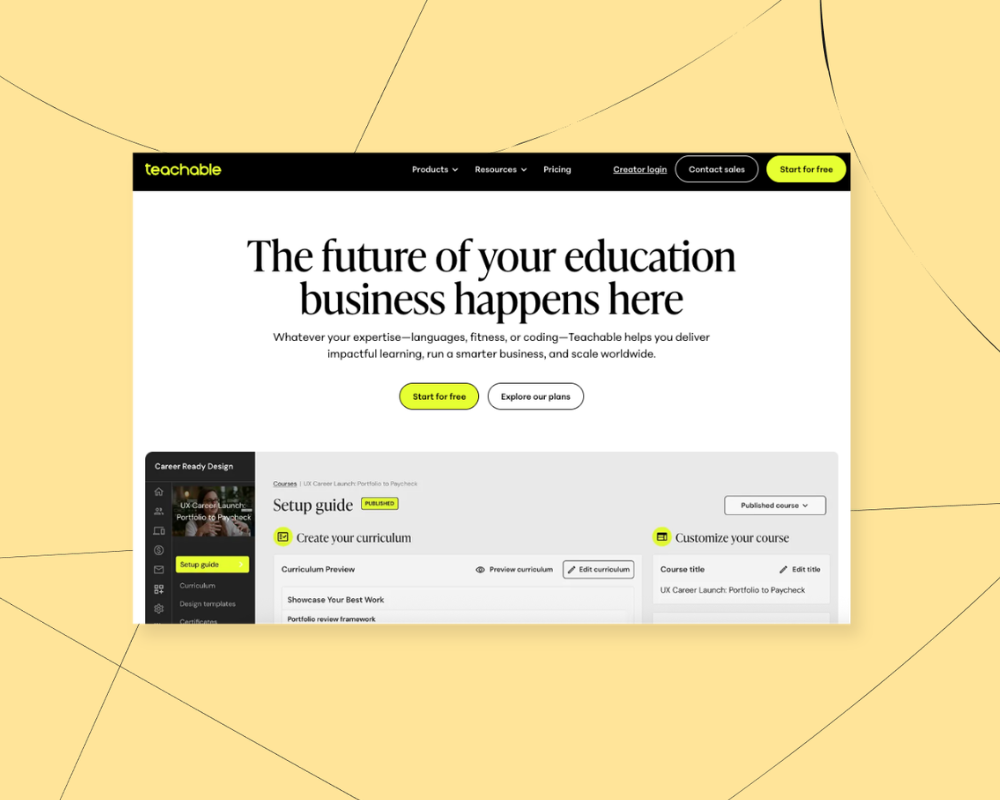
There are dozens of tools available for creators who want to teach what they love online. One popular option is Teachable, a platform that lets creators sell online courses, downloads, and coaching. But even though it’s a common starting point, no platform is perfect for everyone, so it’s natural to wonder what Teachable alternatives are available too.
In this guide, we’ll cover:
- The pros and cons of Teachable for course creators
- 8 alternatives to Teachable to help you start selling your work
- How do pick the best platform for your online business
(Want the quick version? Podia is our top choice Teachable alternative because you can create and sell online courses, community, downloads, memberships, coaching, and events, in the same place as your website and email marketing. Start your 30-day free trial.)
Teachable pros and cons
Teachable is a platform dedicated to selling online courses, and you can also offer downloads, memberships, and coaching. You can use Teachable to set up landing pages and run your affiliate program too, and they’ve recently added lots of AI features to help you build your programs.
Customers often report that Teachable makes things easy to get started. You can set up your first course without coding knowledge, and the platform takes care of all of the technical pieces like checkout and payments.
That said, Teachable has strict product and student limits on all plans, which could be a big barrier grow. On the Starter plan, you can only make 5 products and enroll up to 100 students, and even on the highest-tiered Growth plan you can only make 50 products and enroll up to 5,000 students.
Teachable also used to have a community feature, but they’ve stopped supporting it as of 2026. If you plan to use community in your online business, you’ll need to connect and pay for a separate tool.
Teachable pricing:
- Starter: $39/month ($29/month billed annually), 7.5% transaction fee: 5 products, up to 100 students
- Builder: $89/month ($69/month billed annually), 0% transaction fee: 10 products, up to 1,000 students
- Growth: $189/month ($139/month billed annually), 0% transaction fee: 50 products, up to 5,000 students
- Custom: custom pricing for high-volume sellers
If you're looking for a different feature set, or a more "all-in-one" option without so many restrictions, here are eight alternatives you can try instead.
8 best alternatives to Teachable
1. Podia

Podia is an all-in-one platform where creators can build an online home for their business. With Podia, you can create a website, run your community, and sell online courses, coaching, digital downloads, events, and webinars – all from one dashboard.
Unlike Teachable, Podia offers built-in live chat and customer messaging, full email marketing, and a full online community with the option to make free and paid tiers, making it easy to market your courses and connect with your audience.

You can also use Podia to build a beautiful website for your online business. Piano instructor and Podia creator Joseph D’Amico explains: “Podia makes website building so fun. I feel like I could set up a site in an afternoon, and it would look great. And if there’s something to be said for how pretty it is. It’s the best-looking one by far.”
With Podia, Joseph has built an innovative membership for classical piano instruction. Through his business, Flex Lessons, students can learn from pre-recorded lessons in his membership community and book him for live one-on-one classes.

Here are some more features that make Podia stand out.
Podia features:
- Sell courses, digital downloads, webinars, and coaching sessions on all Podia plans
- Host live, virtual, and in-person events
- Unlimited students on all plans
- Build a community for your customers
- Build your website, blog, and landing pages
- Email marketing tools, like newsletters, automations, and lead magnets
- Affiliate marketing tools
- Create an online store for your customers
- Free migrations on all plans
- Mover: $49/month ($42/month billed annually), 5% transaction fee: 50 products, unlimited students, 100 email subscribers, includes your community, website, landing pages, digital products, and courses
- Shaker: $99/month ($84/month billed annually), 0% transaction fee: 150 products, unlimited students, 500 email subscribers, adds affiliate marketing, upsells, 1 assistant seat, and more integrations
- Earthquaker: $179/month ($150/month billed annually), 0% transaction fee: unlimited products, unlimited students, 1,000 email subscribers, adds unlimited assistant seats and unlimited video storage
All Podia plans include email marketing features like automations, newsletters, email templates, segmentation, tagging, and campaigns. Plans come with a set number of subscribers to start, and you can add on more any time your list grows.
All in all, Podia offers a scalable solution that your business won’t grow out of, without the strict product and student limits of Teachable. Learn more about how Podia compares to Teachable.
Get your free 30-day trial from Podia now to see these features in action.
2. Thinkific

Like Teachable, Thinkific is designed for course creators. Thinkific lets you make unlimited courses on all plans, and all plans have a student cap of 10,000 students.
You can sell courses with live lessons, pre-recorded videos, self-paced content, and cohort programs. Thinkific also offers course completion certificates, assessments and assignments, and lesson prerequisites. You can also use Thinkific to build a storefront or website for your courses.
On higher-tier plans, Thinkific has enterprise-level features like SCORM compliance and CRM integrations. Like Teachable, Thinkific also has AI course building tools to help you make your content faster.
Thinkific features:
- Create unlimited courses for up to 10,000 students
- AI features to help you make your course
- Sell courses, communities, downloads, memberships, and coaching
- Website and sales pages
- Assignments, quizzes, and exams
- Email automations
Thinkific pros:
Thinkific gives you unlimited courses on all plans, and there are no transaction fees when you use Thinkific’s built in payment system. For bigger businesses, Thinkific has corporate features available on Thinkific Plus, and you can add on a branded mobile app for an extra $199/month if that’s something your business needs.
Thinkific downsides:
Thinkific’s Basic plan is pretty limited since you can only make five digital downloads and five coaching or webinar products. You also can’t make paid memberships, subscriptions, payment plans, or product bundles until the Start plan.
Thinkific also has email automations on all plans, but mass student emailing is gated to higher-tier plans. This means you’ll probably need to use another tool for your email marketing when you’re starting out, which is an extra expense.
Plus, there are student limits and storage limits on all plans, which could be tricky as your business grows.
Thinkific pricing:
- Basic: $54/month ($40/month billed annually): up to 10,000 students, 1 community, up to 5 digital downloads, 100GB/month of video bandwidth, no paid memberships
- Start: $109/month ($82/month billed annually): up to 10,000 students, unlimited downloads and coaching, 1 community, 200GB/month of video bandwidth, memberships and subscriptions included
- Grow: $219/month ($164/month billed annually): up to 10,000 students, 3 communities, 400GB/month of video bandwidth, Thinkific branding removed
- Plus: custom pricing, custom student limits, dedicated support
3. Kajabi

Kajabi is an all-in-one platform where you can sell courses, downloads, coaching, podcasts, memberships, and communities. You can also use Kajabi to handle email marketing, create a website, build sales funnels, and manage affiliates.
Kajabi has a lot of advanced features, but it’s also on the pricey side. Plus there are product limits on the first two plans that you might bump up against when you grow.
Kajabi features:
- Sell courses, community, memberships, downloads, coaching, and podcasts
- Build sales funnels
- Email marketing
- Affiliate marketing tools
- No transaction fees if you use Kajabi Payments
- Website and landing pages
- Mobile app for an on-the-go learning experience
Kajabi pros:
Kajabi is an all-in-one platforms for creators and they don’t charge a transaction fee when you use their built-in payment processor. You can build lots of product types, like courses, downloads, coaching, community, memberships, and even podcasts, and you can use Kajabi for your website, blog, landing pages, and email.
Kajabi cons:
The biggest downside to Kajabi is its premium price tag. Kajabi is one of the most expensive online course platforms, making it cost-prohibitive for many creators who are just getting started. In addition to charging a more expensive monthly rate, Kajabi imposes product limits on every plan except Pro:
- Basic plan: 5 products, 2,500 contacts
- Growth plan: 50 products, 25,000 contacts
- Pro plan: unlimited products, 100,000 contacts
Our +900 creator survey revealed that creators have an average of 10.95 products, which means many would have to use Kajabi’s pricey Growth or Pro plan.
Kajabi pricing:
- Basic: $179/month ($143/month billed annually): 5 products, 1 community, up to 2,500 contacts
- Growth: $249/month ($199/month billed annually): 50 products, 1 community, up to 25,000 contacts
- Pro: $499/month ($399/month billed annually): unlimited products, 3 communities, up to 100,000 contacts
4. Udemy

Udemy is an online course marketplace where creators can upload and sell their courses to a wide audience. Udemy handles the marketing of your course, but in turn, you have less control over your content, branding, and income.
Instructors on Udemy are paid through a revenue-sharing plan. If students find your course organically on Udemy, you only keep 37% of the course fee. However, when students enroll using your referral code, you keep 97%.
Udemy features:
- Over 40 million students from around the world
- Free to use
- Learners can leave course reviews
- Instructors can create coupons for their courses and be included in site-wide deals
Udemy pros:
After you upload your course content, selling on Udemy is largely hands-off. This can be an excellent option for instructors who want to earn passive income on their courses without running their own marketing. With over 40 million users, Udemy can make it easier to get your course in front of a large audience.
Udemy cons:
Udemy’s features are extremely limited. There is no website builder, digital marketing tools, email features, membership sites, or digital download functionality. Your courses must match Udemy’s guidelines and formatting too.
When you sell your courses on Udemy, you have no control over your brand or marketing on the platform. Udemy also takes a large percentage of your sales unless your students use your referral code. At the end of the day, this can mean less money in your pocket.
Podia creator John D. Saunders sold his course to over 1,900 customers on Udemy but only earned $1,100 in revenue. When he switched to Podia, he earned $10,000 on launch day alone and has earned over $200,000 on the platform since.
Udemy pricing:
- Free for instructors
- The instructor keeps 97% when the student uses their referral code.
- The instructor keeps 37% if no referral code was used.
5. Teachery

Teachery is a simple online learning platform without the bells and whistles of Teachable. You can create and sell unlimited online courses for unlimited students, and you can make sales pages, membership areas, upsells, bundles, and payment plans.
Teachery has three simple pricing plans (monthly, yearly, and lifetime) that all come with all features, so you only have to decide what billing cycle you prefer. The catch is that they don’t have email marketing built in or a full website builder, so you might need to connect extra tools
Teachery features:
- Unlimited courses, lessons, and students
- Simple course editor with two templates
- Memberships, upsells, and product bundles
- Sales pages and landing pages to promote your products
- Mailchimp and Kit (formerly ConvertKit) integrations
- Affiliate program tools
Teachery pros:
Teachery is best for course creators who want to quickly get things up and running and don’t need a super customized or branded site. The minimalist platform makes it easy to get started. Plus, there are no transaction fees on any plans.
Teachery cons:
Creators who use Teachery don’t get access to a website builder or email marketing features. Teachery also doesn’t include video hosting – you’ll need to embed content through third-party tools like YouTube and Vimeo.
Teachery pricing:
- Monthly plan: $49/month
- Annual plan: $470/year
- Lifetime plan: $950/lifetime deal
6. LearnDash
LearnDash is a learning management system (LMS) plugin for WordPress. With LearnDash, creators can sell courses directly from their WordPress site. The plugin includes a drag-and-drop course builder and dozens of customization options for your courses. You can also use LearnDash to create a membership or subscription program.
LearnDash features:
- Add customized courses to your WordPress site
- Memberships and subscriptions
- Works with most WordPress themes
- Drip content
- Course progress monitoring
LearnDash pros:
The biggest benefit of LearnDash is that you can make unlimited courses for unlimited students. There are lots of customizations, and if you’ve already created your own website in WordPress, LearnDash adds course functionality. With WordPress, you can also use additional plugins and integrations on your site. LearnDash also charges no transaction fees.
LearnDash cons:
You need a WordPress site to use LearnDash, which means paying for web hosting and a domain in addition to LearnDash and dealing with WordPress’s steep learning curve. To make the most of LearnDash, you should be familiar with WordPress and comfortable connecting multiple plugins and integrations. You might also want to hire a developer or web designer to get things up and running.
In addition to the cost of website hosting and domain fees, you may need to pay for email marketing tools and other add-on features to get full functionality in your business. Those expenses can add up quickly.
LearnDash pricing:
- Essentials: $259/year: drag-and-drop course builder, quiz builder, memberships and subscriptions
- Pro: $399/year: everything in Essentials plus AI course outline and quiz builder, advanced reporting and analytics
- Elite: $599/year: everything in Pro plus groups course management, multi-instructor course management
- Plus all the costs associated with starting and running a WordPress site
7. LearnWorlds
LearnWorlds is an LMS platform that lets creators create and sell online courses in the same place you build your website and mobile learning apps. LearnWorlds AI is included on all plans if you’re interested in AI features, and the LearnWorlds mobile app builder lets you offer in-app purchases, send notifications, and even create a white-label experience with a branded app for an extra fee.
The catch is that there are unique limitations on the lowest-cost Starter plan. Starter plan customers can’t make free courses, and LearnWorlds charges a $5 flat rate fee per course sale on that tier. There are no landing pages or subscriptions on the Starter plan either.
Plus, all plans have limits on how many active students you can have, which could be a problem if your course takes off.
LearnWorlds features:
- Sell online courses, memberships, subscriptions, and bundles
- Website builder and landing pages (on Pro Trainer plans and up)
- Mobile app with in-app purchases and notifications (additional fee)
- Assessments, quizzes, question banks, and course completion certificates
- Built-in video editing and transcription tools
- SCORM and HTML5
LearnWorlds pros:
If your main priority is selling courses through an LMS tool, LearnWorlds is a comprehensive online learning platforms for educators and entrepreneurs. It’s SCORM compliant and you can make unlimited courses with assessments and interactive videos.
The mobile app builder gives creators a way to create an on-the-go learning experience for their students.
LearnWorlds cons:
LearnWorlds focuses first and foremost on online courses, making it a limited choice for creators who want to sell additional digital products, downloads, coaching packages, or services.
The $29/month Starter plan may seem like a great deal, but creators pay a flat transaction fee of $5/course sale, which can add up quickly.
All plans have a limit on how many students you can enroll, and email features are limited to mass emailing, so you’ll likely need to use another email marketing platform too.
LearnWorlds pricing:
- Starter: $29/month ($24/month billed annually): $5 fee per paid enrollment, 1,000 active learners, 1 admin seat
- Pro Trainer: $99/month ($79/month billed annually): no enrollment fees, 2,000 active learners, 5 admin seats
- Learning Center: $299/month ($249/month billed annually): 2,000 active learners, 25 admin and team seats
- Mobile app builder available as a paid add-on ($149/month)
- Corporate: custom pricing
8. Mighty Networks
Mighty Networks is an online community platform where you can offer courses within your community membership. When you build a community on Mighty Networks, you can charge for memberships with recurring billing or one-time subscriptions. Advanced community features include live streams, direct messaging, virtual events, and member profiles.
Mighty Networks features:
- Community and membership site features
- On-demand, cohort, and live courses
- Live streams, live events, and event calendar functionality
- Group and private chat messaging between members
- Unlimited members and moderators
Mighty Networks pros:
Mighty Networks was designed for running communities, which means its membership features are strong. You can create private groups and community areas, live stream content, and host events within your community. You can also create courses within your community, and courses can have quizzes, tests, and resource libraries.
Mighty Networks cons:
Online course features are included on every plan, but if you plan to sell digital downloads, coaching, consulting, or tutoring services, you may need to pay for additional tools.
The Launch and Scale plans only come with one landing page (Growth comes with three and Mighty Pro comes with 10), so you will likely need another tool for your website and pages. Mighty Networks doesn’t have email marketing either, so that’s another expense. Mighty Networks users also pay a 3%, 2%, or 0.5% transaction fee, depending on the plan.
Mighty Networks pricing:
- Launch: $95/month ($79/month billed annually): 2% transaction fee, 200GB storage
- Scale: $215/month ($179/month billed annually): 1% transaction fee, API access, more automations, charge for events, 500GB storage
- Growth: $425/month ($354/month when paid annually): 0.5% transaction fee, advanced automations, priority support, and 1TB storage
- Mighty Pro: custom pricing: 0.5% transaction fee, 4TB storage
- Custom-branded mobile apps available for an extra fee with Mighty Pro
Find the right Teachable alternative for you
Best free alternative to Teachable:
- If you're looking for a hands-off way to sell courses without building your own brand, Udemy is free forever. The catch is that you don’t have as much control over your courses, pricing, and marketing.
More affordable Teachable alternatives:
- Podia: Plans start at $49/month, but with a 5% transaction fee and 50 products included, compared to Teachable's 7.5% fee and 5-product cap on Starter
- LearnWorlds: Plans start at $29/month, though that tier carries a $5 fee per paid enrollment
- Teachery: Plans start at $49/month, with no transaction fees and unlimited products and students
- LearnDash: Plans start at $259/year, with no transaction fees and unlimited products and students
Best alternatives that integrate with WordPress:
- LearnDash is a WordPress plugin
Best all-in-one alternative to Teachable:
- Podia is the best value all-in-one alternative to Teachable for building your online business
Podia has your courses, community, memberships, coaching, downloads, webinars, and events, all under one roof. You can build your website, create sales pages, and run your email marketing, and you’ll have everything you need to start building without the technical headaches.


