

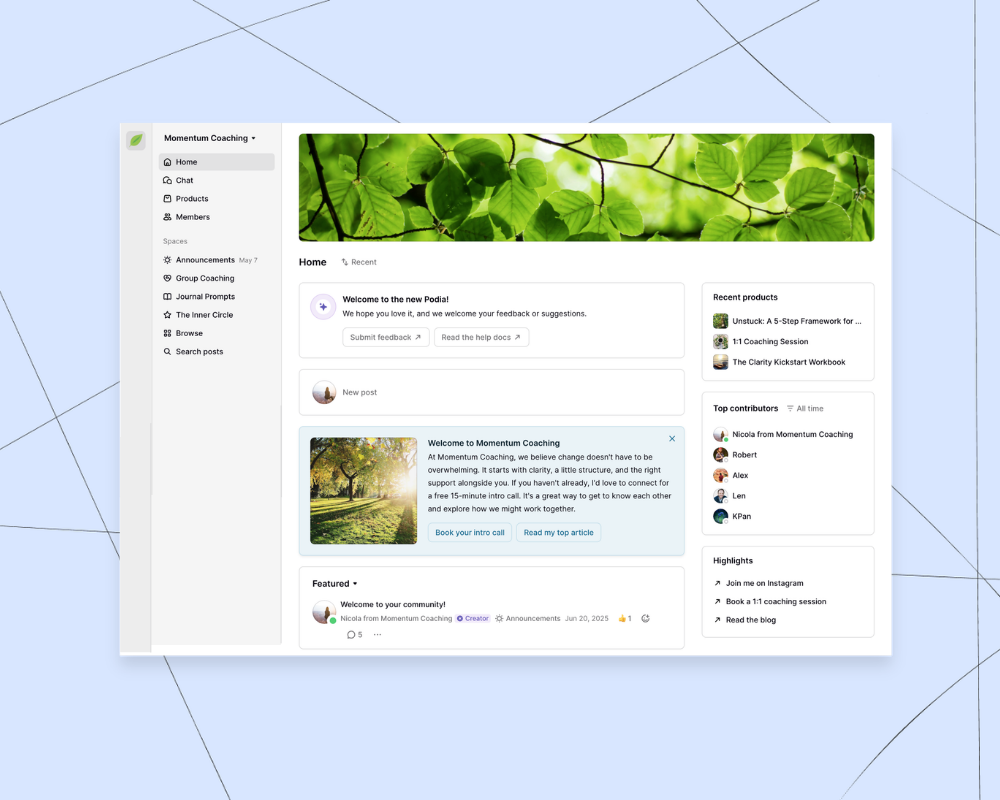

Online communities bring people together. They let you spend time with your audience, serve your customers, and learn alongside like-minded people. Communities can also generate recurring income, freeing you up to make even more great content and do the work you love.
That recurring income piece isn’t hypothetical, either: subscription businesses grew their unique subscriber counts by 25% over the past two years, and 68% of U.S. consumers subscribed to a new service for the first time in 2024, according to Zuora’s 2025 Subscription Economy Index.
But when you sit down and actually choose a community platform, it’s important to remember that the community itself is usually just one part of the puzzle.
To build a community around your work, you also need a way to tell people it exists. That means marketing tools, a website, and sales pages that explain what's inside and why someone should join.
You'll likely want digital products too, whether those are bundled into a membership or sold as standalone offers for people who want a different kind of experience. And within your community, you need enough flexibility to create different plans, charge different prices, and give members real ways to connect with each other.
For pricing context, consider what people already pay for content they enjoy: the average subscribing household spends $69 per month on streaming services, according to Deloitte’s 2026 Digital Media Trends survey — meaningful recurring revenue doesn’t require a massive audience, just a community worth a slice of that budget.
All of that means the platform you choose matters more than it might seem at first. If you pick one that's too limited, you'll end up stitching together a bunch of separate tools just to cover the basics. But if you pick one that grows with you, your community, your products, your website, and your email list can all work together from day one.
In this article, we'll cover the best online community platforms. Every tool on this list lets you build a collective space where members can interact. But as you read, pay attention to what each platform includes beyond the community itself, because that's often what makes the difference as your business grows.
In this article, you'll learn:
- The pros and cons of 9 popular online community platforms
- How each tool can help you build and grow your business
- Which community platform is the right fit for you
(And if you’re short on time, here's the bottom line: Podia is our top pick community platform for creators. Your community connects automatically to your website, blog, digital products, courses, and email marketing, all in one place. Start your 30-day free trial.)
#1 Podia: All-in-one community platform for creators who want everything connected

Podia is an all-in-one platform for building your online business. You can set up a community, sell digital products, and host virtual and in-person events, all in a tool that’s automatically connected to your website, blog, and email.
Having everything under one roof creates a great experience for your customers because they won't have to log into dozens of different platforms.
When they log into your Podia, each customer will see a customized home feed with everything they need, whether they’ve signed up for a VIP community plan, joined a course, opted-in to a free challenge, or all of the above.
Podia's community feature lets you organize content by topic, share announcements, and upload rich media like videos, audio, and images. Your members can interact through 1:1 chats, posts, comments, and likes, and you can bundle resources like courses and products with your community plans. It’s also easy to create private spaces for cohorts, masterminds, premium members, or other subgroups within your community.
You can give people access to your community for free, and you can also create as many paid plans or subscription tiers as you like, giving you lots of flexibility as your business grows. You can also sell products entirely on their own, outside of any community plan. That means a course, digital download, workshop, or coaching offer can stand alone as its own purchase, or come bundled with community access. Whatever makes sense for your business.
In addition to running communities, Podia has your digital downloads, online courses, coaching sessions, and events (including in-person ones). There are built-in email marketing and affiliate marketing tools, and you can create a website, blog, and SEO-friendly sales pages directly on the platform.
How does Podia help you grow your business?
Podia has your website, blog, email, and products, and your community platform is already built in. When you use Podia for your community and business, you can build a full system for finding customers, growing your email list, welcoming them into your community, and selling them products that help them achieve their goals.
With Podia’s email feature, you can also move your relationships away from social media algorithms, so you have more control over how you stay in touch. From there, you can use automations to run welcome campaigns and sales funnels, and send newsletters and updates so everyone stays in the loop.
Podia community pros:
- Create free and paid communities with different pricing tiers
- Set up private spaces for running cohorts or mastermind groups
- Activity feed, member directory, groups, and direct messaging
- Host live, virtual, and in-person events
- Sell digital products, courses, and coaching
- Sell products as standalone offers or bundle them with community access
- Build your website, blog, and sales pages all in one place
- Run email marketing, newsletters, and automations
- Create an affiliate program
- Free migrations included on all paid plans
Podia community cons:
- If you enjoy coding and building custom apps for your business, a done-for-you platform like Podia won't be the best fit
How much does Podia cost?
When you're ready to choose a plan, here's how Podia’s pricing breaks down:
- Mover: $49/month with a 5% transaction fee ($42/month paid annually). Includes your community, website builder, blog, landing pages, digital products and courses, with 50 products, storage for 500 videos, and 25 community spaces
- Shaker: $99/month with no transaction fees ($84/month paid annually). Includes everything in Mover, plus affiliate marketing, upsells, one assistant seat, and integrations with PayPal, Zoom, and Zapier, with 150 products, storage for 1,000 videos, and 100 community spaces
- Earthquaker: $179/month with no transaction fees ($150/month paid annually). Includes everything in Shaker, with unlimited products, unlimited video storage, unlimited assistant seats, and unlimited community spaces
All Podia plans include email marketing tools like automations, newsletters, templates, segmentation, and campaigns. Mover includes up to 100 email subscribers, Shaker up to 500, and Earthquaker up to 1,000. You can add more subscribers to any plan as your list grows.
You can try Podia free for 30 days.
#2 Circle: Community-first platform with courses built in

Circle is an all-in-one option for creators who primarily need community features. You can create different subscription tiers, build a member directory, chat privately or in group messaging rooms, and run events with their own dedicated spaces. You can also set up open and private areas for organizing cohorts of students.
Both Professional and Business plan members can run live video streams, and Circle integrates with lots of tools so you can connect it with what you're already using. Circle also includes a website builder and blog, with email marketing available as an add-on.
If you choose to offer products with your Circle community, it’s helpful to know that products and courses are built inside your community rather than sold as standalone offers.
Creators also pay transaction fees on top of a flat monthly rate on every Circle plan, including the top tier. There are storage limits too, which could be a challenge if you plan to share a lot of video or large files.
How does Circle help you grow your business?
Circle is an all-in-one option for businesses that center entirely on community access. Circle Plus (their enterprise tier) adds more advanced options like white-labeled mobile apps and AI workflows, but those are custom-priced and designed for larger organizations.
Circle community pros:
- Create free or paid community memberships
- Offer digital products and courses inside your community plans
- Run virtual events and live streams
- Private and public community spaces
- Website builder and blog included
- Email marketing and automations
Circle community cons:
- No standalone digital downloads or coaching products outside the community
- Transaction fees on every plan (2% on Professional, 1% on Business)
- Storage limitations (100GB on Professional, 250GB on Business)
- Free migrations only available on Business plan ($199/month) and above
How much does Circle cost?
Circle's pricing is listed for annual billing. Month-to-month pricing isn't shown on their site, so the actual cost could be slightly higher if you're not paying annually.
- Professional: $89/month and 2% transaction fee: Includes 20 community spaces, 100GB storage, 100 live stream attendees
- Business: $199/month and 1% transaction fee: Includes 30 community spaces, 250GB storage, automations, 200 live stream attendees
- Circle Plus: Custom pricing: Includes enterprise features including white-label mobile apps, AI workflows, and advanced admin tools
Circle also has a paid email add-on. You can pay for more subscribers as your list grows, and email plans start at +$19/month (on top of your base plan) for 1,000 subscribers.
#3 Mighty Networks: Community, courses, and livestreams

On Mighty Networks, you can create free and paid communities with unlimited members. This platform lets you host live events, sell courses, add gamification features like points and leaderboards, and organize your community into different spaces and tiers. On the highest-tier Mighty Pro plan, you can also create a custom branded app for an additional fee.
Mighty Networks says that one of their main selling points is that you can offer community and courses in one place. With your community, you can have chat messages and activity feeds, and even host live streaming events (up to a certain number of hours and participants each month, depending on the plan). With your courses, you can do on-demand, cohort, and drip courses.
That said, Mighty Networks doesn't include a website builder or email marketing so you'll need to find and pay for separate platforms to handle those parts of your business. Landing pages are also limited to one per plan on Launch and Scale, which can make it harder to promote multiple offers.
Like many community platforms, Mighty Networks charges transaction fees on top of a flat monthly rate, and those fees apply on every plan, including the highest tier.
How does Mighty Networks help you grow your business?
Mighty Networks works well as a community and course platform, but it's focused primarily on that piece of the business. If you want a website, email list, or the ability to sell other standalone digital products, you'll need to connect additional tools to make it work.
Mighty Networks pros:
- Free and paid community memberships with unlimited members
- Host live events and run livestreams
- Sell online courses
- Gamification features like points, levels, and leaderboards
- Build your own app (for an extra fee)
Mighty Networks cons:
- No website builder
- No email marketing
- No easy way to sell digital downloads or coaching
- Landing pages are limited to one per plan on Launch and Scale
- Transaction fees on every plan, including the top tier (2% on Launch, 1% on Scale, 0.5% on Mighty Pro)
- Storage limitations on all plans (200GB on Launch, 500GB on Scale, 4TB on Mighty Pro)
How much does Mighty Networks cost?
Here are Mighty Network’s pricing plans:
- Launch: $95/month ($79/month paid annually) with a 2% transaction fee. Includes unlimited members, community, courses, basic automations, 20 spaces, and 200GB storage.
- Scale: $215/month ($179/month paid annually) with a 1% transaction fee. Includes everything in Launch, plus advanced automations, API and integrations, migration services, and 500GB storage.
- Mighty Pro: Custom pricing with a 0.5% transaction fee. Includes everything in Scale, plus custom-branded iOS and Android apps, a dedicated strategy team, advanced reporting, and 4TB storage.
#4 Skool: Community platform with gamification

Skool is a community platform built to bring people together around a shared interest or goal. You can create free and paid memberships with unlimited members, organize your community into spaces, and add gamification features like points, levels, and leaderboards to keep people engaged. Skool also includes video hosting, live streaming, and the ability to add courses to your community.
One of Skool's built-in discovery tools is its community marketplace, where people can browse and request access to groups. This can help new members find you, though it can also bring in people who are less familiar with your work.
Skool doesn't include a website builder, blogging, or landing pages, so you'll need separate tools to explain your offer and bring people in from search or social.
Email marketing is also not included. Skool lets you send broadcast-style emails to existing members, but you can't build an email list, create automated sequences, or reach people who haven't joined yet.
Skool also charges transaction fees on every plan, including the higher-priced Pro plan, and there's no option to remove them as your revenue grows.
How does Skool help you grow your business?
Skool works well as a standalone community platform, especially if you already have a website, an email list, and an audience you can point toward your community. The gamification features and marketplace can help with engagement and discovery, but building an audience from scratch will be harder without a website or email marketing built in.
Skool pros:
- Free and paid community memberships with unlimited members
- Gamification features like points, levels, and leaderboards
- Video hosting and live streaming included
- Courses can be gated by plan or level
- Built-in affiliate marketing
- Community marketplace for discovery
Skool cons:
- No website builder, blogging, or landing pages included
- No email marketing beyond basic member broadcasts
- No coaching or digital downloads
- Transaction fees on every plan (10% on Hobby, 2.9% on Pro)
- Courses are fairly basic, with no quizzes or completion certificates
- All community categories are shared across all members, with limited ability to segment spaces by plan or tier
How much does Skool cost?
Here's how Skool’s plans break down:
- Hobby: $9/month with a 10% transaction fee. Includes unlimited community members, video hosting, and live streaming.
- Pro: $99/month with a 2.9% transaction fee. Includes everything in Hobby, plus custom URLs, advanced analytics, and the option to hide suggested communities.
One thing worth knowing: transaction fees apply on both plans so the price you pay will increase along with your revenue. There's no way to move to a flat fee as your business grows.
#5 Patreon: Fan membership platform for recurring support

Patreon is a membership platform built around the idea of fan support. Creators can set up subscription tiers where followers pay a recurring amount in exchange for exclusive content and access.
You can share posts, chat with members, offer different pricing tiers, and accept monthly or annual payments. Patreon also has a basic storefront where you can sell digital files and accept one-time payments.
Beyond those features, Patreon is designed primarily as a fan funding platform, not a full business tool. There's no website builder, blogging, landing pages, or email marketing included.
You get a creator page where you can add a profile image, cover photo, and a description of your program, but there's limited customization and you can't turn off Patreon's branding. If you want to sell courses, run events, or offer coaching, you'll need to use separate tools.
Patreon also charges a 10% transaction fee on every sale, with no option to reduce or remove it as your revenue grows. If a customer subscribes through the Patreon iOS app, Apple takes an additional 30% on top of that.
How does Patreon help you grow your business?
Patreon works well as a way to collect recurring support from fans who love your work, especially if you already have an audience and just need a simple place to accept payments. But building an audience from scratch will be harder without a website, email marketing, or the ability to sell a full range of products.
Patreon pros:
- Free to use with no flat monthly fee
- Simple setup for fan memberships and recurring subscriptions
- Monthly and annual subscription options
- Basic digital file sales through the storefront
- Community features including posts, chat, and member notifications
Patreon cons:
- 10% transaction fee on every sale, with no way to remove it (plus 30% additional on iOS purchases)
- No website builder or blogging
- No landing pages or email marketing
- No online courses, events, or coaching tools
- Limited customization on your creator page
How much does Patreon cost?
Patreon is free to sign up and use. Instead of a monthly fee, you pay a percentage of everything you earn:
- 10% transaction fee on all sales made on the platform
- An additional 30% on sales made through the Patreon iOS app (this goes to Apple, on top of Patreon's fee)
For example, if your business brings in $2,000 a month, you'd pay $200 in Patreon fees. And that number goes up every time your revenue does.
#6 BuddyBoss: WordPress plugin for custom community builds

BuddyBoss is a WordPress plugin that lets you build an online community and learning experience on your WordPress website. You can create an activity feed, build a member directory, set up groups and forums, and run online courses with features like quizzes, certificates, gamification, and lesson unlocks. There's also a direct messaging system, event management, and support for an online store through integrations.
Because BuddyBoss is built on WordPress, you have a lot of control over how everything looks and works. Those with some coding experience will have virtually endless creative options, and there's an API and developer toolkit available for more advanced builds. And WordPress has thousands of integrations let you connect tools you're already using.
That said, building everything yourself can get complicated quickly. You'll need to pay separately for website hosting, and you may need additional paid plugins to get all the features you want.
This option works best for creators who are already comfortable working in WordPress and want full control over their setup.
How does BuddyBoss help you grow your business?
If your business already runs on WordPress, BuddyBoss is a natural fit for adding community and learning features to your existing site. You get a lot of flexibility, and you can build something highly customized over time. Just keep in mind that the more tools you add, the more there is to manage and maintain. If you're not already a WordPress user, the setup process may be more involved than you'd expect.
BuddyBoss pros:
- Lots of flexibility to build and customize on WordPress
- Courses with gamification, quizzes, certificates, and lesson unlocks
- Activity feed, member directory, groups, events, and direct messaging
- API and developer toolkit for advanced customization
- Thousands of integrations available via WordPress plugins
BuddyBoss cons:
- Requires separate website hosting
- Additional plugins for courses and other features can add up in cost and complexity
- Steeper learning curve compared to all-in-one hosted platforms
- Managing multiple third-party tools can become challenging as you grow
How much does BuddyBoss cost?
BuddyBoss pricing is annual. Current plans include:
- Pro: $299/year (regularly $399/year). Includes the premium BuddyBoss theme, unlimited members, groups and courses, Zoom integration, live messaging, notifications, custom profiles and directories, content moderation, polls, and scheduled posts.
- Plus: $349/year (regularly $599/year). Includes everything in Pro, plus a full gamification system with points, ranks, leaderboards, achievements, and competitions.
- Done For You Bundle: $2,499 for the first year, then $599/year. Includes the Plus plan along with expert setup of your entire platform, including courses, community configuration, engagement tools, and a pre-built sales and marketing website.
Note that these prices cover the BuddyBoss platform itself. Hosting, your website theme, and any additional plugins are separate costs to factor in.
#7 Facebook groups: Free community space on social media

Facebook is a common starting point for small business owners because it’s free, easy to set up, and requires little explanation to your followers. With billions of monthly active users, it’s likely your community members are already familiar with Facebook.
New followers can discover your page through Facebook’s built-in search features, and you’ll get helpful tools like live-streaming, content moderation, and polls.
On the flip side, you’ll always be up against algorithms if you host your community on social media. Your posts might only be shown to a small percentage of your audience, and you can’t control who sees what.
Podia creators Jill and Jeffrey Dalton from The Whole Food Plant Based Cooking Show moved their community away from social networks and onto Podia for visibility reasons, and so they could charge for community access.
When explaining why they switched off Facebook, they say, "The supporting member community we have built on Podia has truly made it possible for us to focus full time on creating The Whole Food Plant Based Cooking Show and offer our recipes freely to everyone who needs them.”
With Facebook, you can’t create membership tiers or charge for community access, making community monetization a challenge. You also can’t use a custom domain or create a white-label community solution if that’s what your business needs.
How do Facebook groups help you grow your business?
Facebook groups can help you build an audience, but they don't have any features that build your business. If you want to make money off that audience, you'll need to use separate platforms for product creation, payment processing, and communicating away from the algorithm.
Facebook group pros:
- You can have unlimited group members
- It's one of the most well-known free community platforms
- Access to live streams, rich media uploads, and moderation tools
Facebook group cons:
- Your content might not be shown to all of your followers
- The platform can be distracting, resulting in lower member engagement
- It’s hard to monetize your Facebook community and create paid memberships
- Members will see third-party advertisements on Facebook along with your content
- No custom domains or white labeling
- Concerns with platform ethics and privacy
How much do Facebook groups cost?
Facebook groups are free to use.
#8 Discord: Chat tool built for casual connection

Discord was originally created so groups of friends could stream video games and chat simultaneously, but some creators use it to build an online community too. Discord lets you create channels around different topics, talk with members, run group audio and video calls, and share your screen.
You can also use the soundboard, custom emoji, stickers, and other tools to make conversations more fun. There are private channels, custom permissions for members, and built-in entertainment features like watching videos together and playing built-in games.
That said, Discord is built for gaming and social chat, not necessarily for running a business. There's no straightforward way to charge for access to a Discord group, and there are no built-in sales pages, storefronts, or digital product tools.
Basically, you'd need to connect third-party tools to handle anything business-related. Discord works well as a casual gathering space, but it's best suited for creators who don't need content management, event tools, or paid community tiers.
How does Discord help you grow your business?
Discord gives you a place to connect with your audience in a casual, conversational setting, but there are no native tools for earning money or growing your business. To do that, you'd need extra platforms alongside it. (Podia has a native integration with Discord, so if you love Discord's chat experience, you can use it alongside Podia for your community.)
Discord pros:
- Free to use at the basic level
- Group audio and video calls, screen sharing, and streaming
- Create channels for different topics and private spaces
- Fun engagement tools like soundboards, stickers, and built-in games
Discord cons:
- No straightforward way to charge for community access
- No sales pages or storefronts
- No built-in tools for selling digital downloads, courses, or coaching
- Primarily designed for gaming and social chat, not business management
How much does Discord cost?
- Free
- Nitro Basic: Paid plan with more customization options and larger file sharing. Pricing varies by country.
- Nitro: Full paid plan with additional perks on top of Nitro Basic. Pricing varies by country.
#9 Slack: Team messaging that some creators repurpose for communities

Slack mainly functions as workplace chat software but could be repurposed for online communities. With Slack, you can create public and private channels for each topic you discuss, send messages to groups and individuals, and make audio and video calls directly in the app. The software integrates with a wide range of popular tools, and there's a mobile app for iOS and Android.
The downside of using Slack for your online community is that you can't directly charge for access or create membership tiers. It doesn't come with a public-facing website or sales page, which makes building a challenge.
On the free plan, you can only search through a limited message history, which could become a problem quickly if your community is active and you want members to find older conversations. Upgrading to a paid plan unlocks unlimited message history, but paid plans charge per user, which can get expensive as your community grows.
How does Slack help you grow your business?
While some creators do use Slack for their communities, its main purpose is internal team communication. It's worth exploring as your team grows, but for most creators, Slack works better as an internal tool than a customer-facing community. That said, it could work well for a small, exclusive group of VIP members where you're not worried about charging for access or managing lots of content.
Slack pros:
- Chat-based software with well-organized conversations
- Public and private channels
- Group and individual messaging
- In-app audio and video calls
- Strong integrations with other tools
Slack cons:
- No option to charge for community access
- No sales pages or website to promote your community
- Paid plans charge per user, which can become costly for larger communities
How much does Slack cost?
- Free plan: Includes channels, search features, and 1:1 huddles between members. Messages and file history is saved for 90 days.
- Pro: $7.25/month per person billed annually ($8.75/month billed monthly). Includes unlimited message history, unlimited app integrations, unlimited workflows, and group meetings.
- Business+: $15/month per person billed annually ($18/month billed monthly). Includes everything in Pro, plus AI features like search, daily recaps, file summaries, and a personal AI agent, along with single sign-on and user management tools.
- Enterprise+: Custom pricing. Designed for large organizations needing advanced security, compliance, and cross-functional tools.
Choosing an online community platform that grows your business
Communities can bring a lot of value to your online business, and for most people, the best platform for building your online community is one that's connected to everything else you do.
With Podia, you can create a free or paid online community that's automatically linked to your website, blog, landing pages, courses, products, coaching, and events. Podia also has a full website builder so new people can find your work, and an email marketing tool so you can stay in touch with your members and grow your business long into the future.
By choosing an all-in-one option with community at the heart, you’re giving yourself full flexibility to grow something special with your audience right from day one. Sign up for a 30-day free trial and see for yourself.
Frequently asked questions
What is the best online community platform?
For most creators, the best community platform is one that's connected to everything else you do — and that's where Podia shines. Your free or paid community links automatically to your website, blog, landing pages, courses, products, coaching, and email marketing, starting at $49/month ($42/month paid annually) on the Mover plan, with a 30-day free trial.
If you only need community features, Circle and Mighty Networks are strong community-first picks, with Circle adding courses and a website builder and Mighty Networks starting at $95/month ($79/month paid annually).
Is Skool a good community platform?
Skool is a simple, gamification-driven community platform, and it can work well if discussion and engagement are your whole business. The Hobby plan is $9/month with a 10% transaction fee, and the Pro plan is $99/month with a 2.9% fee.
The catch is that transaction fees apply on both plans, so the price you pay increases along with your revenue, and there's no way to move to a flat fee as your business grows. Podia's Shaker plan, by contrast, is $99/month ($84/month paid annually) with no transaction fees and includes your website and email marketing.
Can I run an online community for free?
Yes — Facebook groups are free to use, and Discord is a popular free option too. They're fine for casual spaces, but they come with real trade-offs: on Facebook you're always up against the algorithm and can't control who sees your posts, and Discord has no straightforward way to charge for access since it's built for gaming and social chat rather than running a business. If you want to charge for membership, a dedicated platform like Podia gives you paid communities plus the marketing tools to grow them.


